


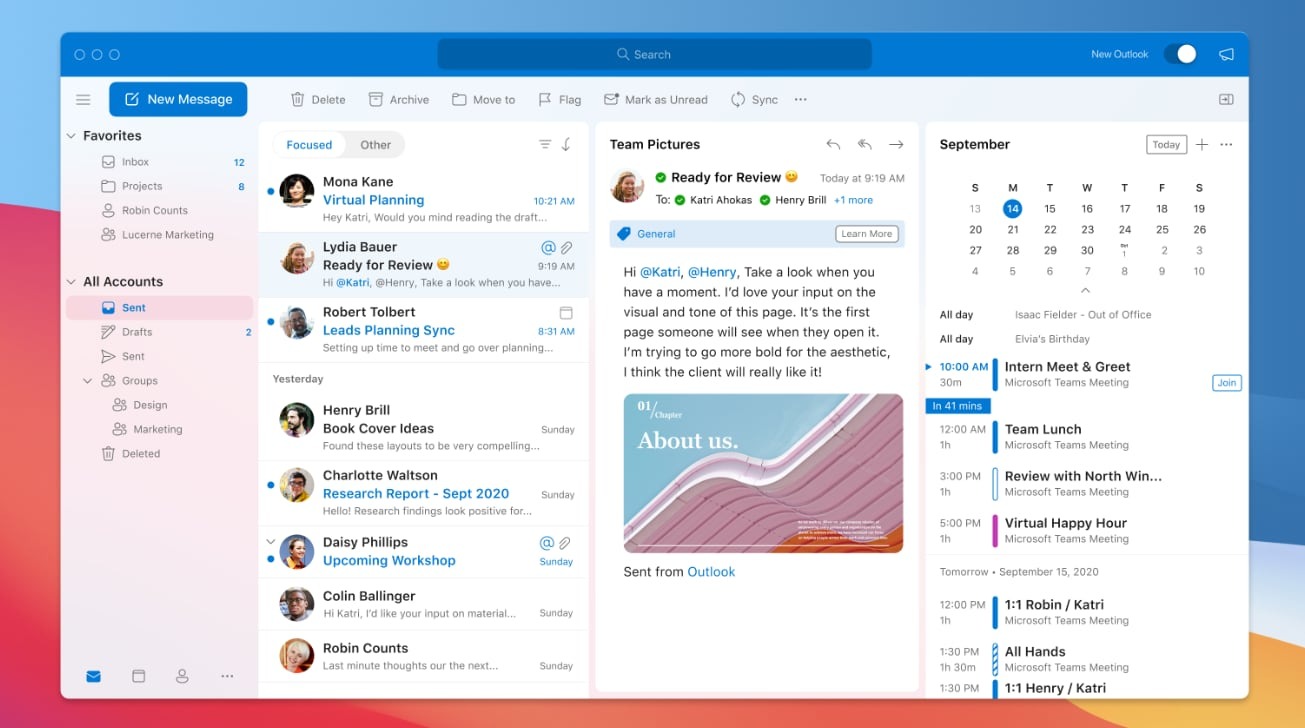
Microsoft is all set to launch new Outlook for Mac design next month. The new design includes Microsoft’s Fluent icons, rounded corners, and changes to make the email app ready for macOS Big Sur.
Microsoft’s Ribbon interface has been removed, and everything looks a lot cleaner. It’s a hybrid of Apple’s macOS design and Microsoft’s own Fluent design.
Reading and writing emails have been improved with single-line views, a new mail compose UI, and even a feature to ignore emails. Panels are also collapsible so it makes Outlook for Mac a lot more customizable for the main view of emails.
Microsoft has also improved the way contacts work in Outlook for Mac. The People section now separates out contacts and co-workers from events and email messages, and it’s easier to see frequent contacts or simply mark existing ones as favorites.
Outlook for Mac also includes changes in calendar and search features. Calendars can now be grouped by ones you own, those that are shared with you, and group calendars found on Microsoft 365. Search should also be a lot more relevant now, as Outlook for Mac is powered by the same Microsoft search found elsewhere in Office 365.
Microsoft seems to have focused a lot on customization and personalization with this new Outlook for Mac design. You can now tweak the message list density to compress it to see more.
Outlook for Mac design will roll out to all users in mid-October.


